Timesheets
Measuring time spent on a project
Timesheets: the gap between the time you sold and the time you actually spent.
Translated from the French original. The screenshots show Odoo in French, as our Senegalese clients use it.
Introduction
When carrying out a project sold to a client, the time estimated beforehand often fails to match reality — which means the quotation the client accepted may well have been under-estimated. In Senegal it is generally difficult to invoice the real cost of a project afterwards, based on the time spent. The client will be reluctant to give you a free hand and take the risk of paying for however long the work actually took. As in: "I will invoice you for the time my designer really spends on your site. If it takes two days I invoice two days, if it takes five I invoice five. You will then feel freer to ask for corrections, changes or additions."
That proposal rarely lands, usually for fear of being over-charged. Commercial habit has therefore fixed the idea of a fixed price in service quotations. You estimate, say, three days of design in the quotation and you invoice three days, whether the technician spent two or five. And too bad if it took longer.
Hence the need to measure the time spent precisely, to know the real cost in people — which then lets you adjust your estimates or your selling rates on the next quotation, and get closer to what things actually cost.
So how do you measure the time spent on a project, simply? Fortunately Odoo takes care of it for you.
Creating a service quotation in Odoo
To show how easily a project can be broken into tasks in Odoo, how each task can be given an estimated duration, and how the time actually spent and the cost it represents can then be entered, we are going to ask Odoo to create a project automatically from our sales order.
Suppose we are selling the creation of a website with two kinds of service:
- design work (estimated at 3 days)
- web integration (estimated at 5 days)
Here is our quotation in Odoo:
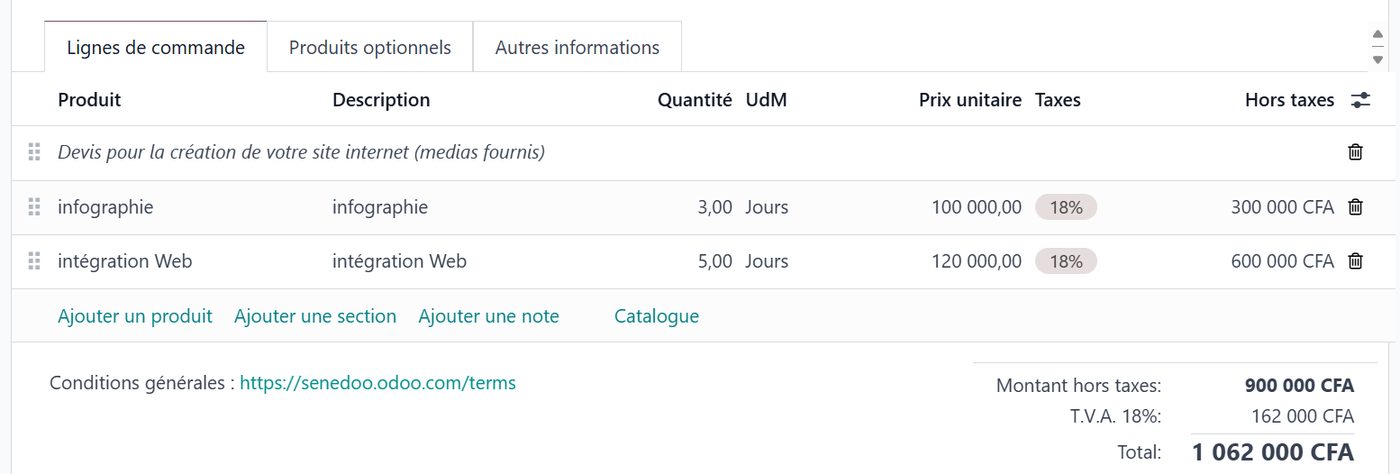
Each of the two lines of our quotation holds a service configured as follows:
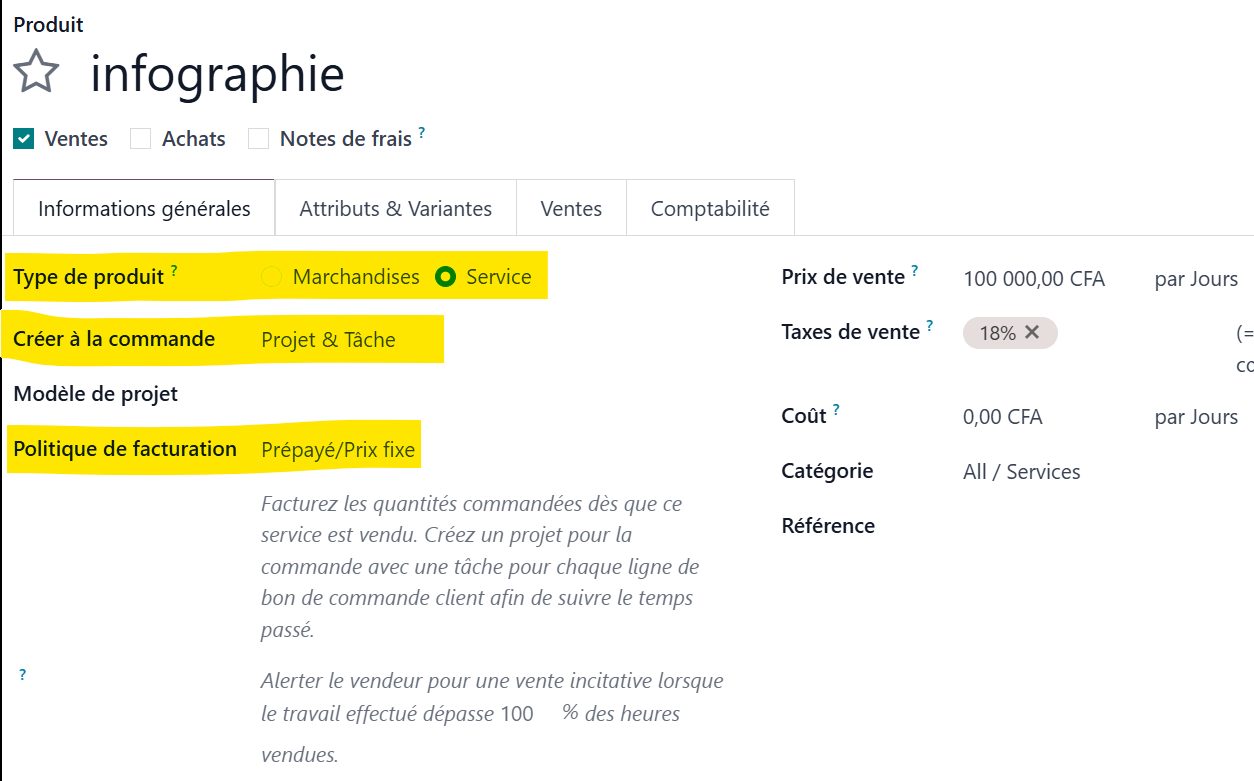
The settings of the "design work" product are these:
- Product type: "service"
which allows it, on the one hand, to be sold by the hour or by the day, and on the other hand to define what happens when the order is placed, once the client accepts the quotation. Here I chose:
- Create on order: "Project and Task"
so that a project will be created automatically and each line of my quotation will become a task to carry out. Two tasks will also be created automatically, one for the design work and one for the web integration.
- Invoicing policy: Prepaid / Fixed price
We said at the outset that we would not invoice our services by time spent — that would have meant choosing "Based on timesheets" — but at a fixed price.
The project is created automatically in Odoo
Our client has accepted the quotation. One click on "Confirm" and the quotation becomes a firm order. With our settings, Odoo creates a project the moment it is confirmed.
You can see straight away that it has tied a project, two tasks and two timesheets to our order:
Coming back here while the website is being built, you will also see a summary of how the order is progressing — here nothing has started yet, so 0% of the tasks are done and no time has been recorded on the project.

Let us click the "Projects" smart button on our order, to save time and land straight in our project:

Odoo has carried over the essentials it found in the client's sales order to set the project up:
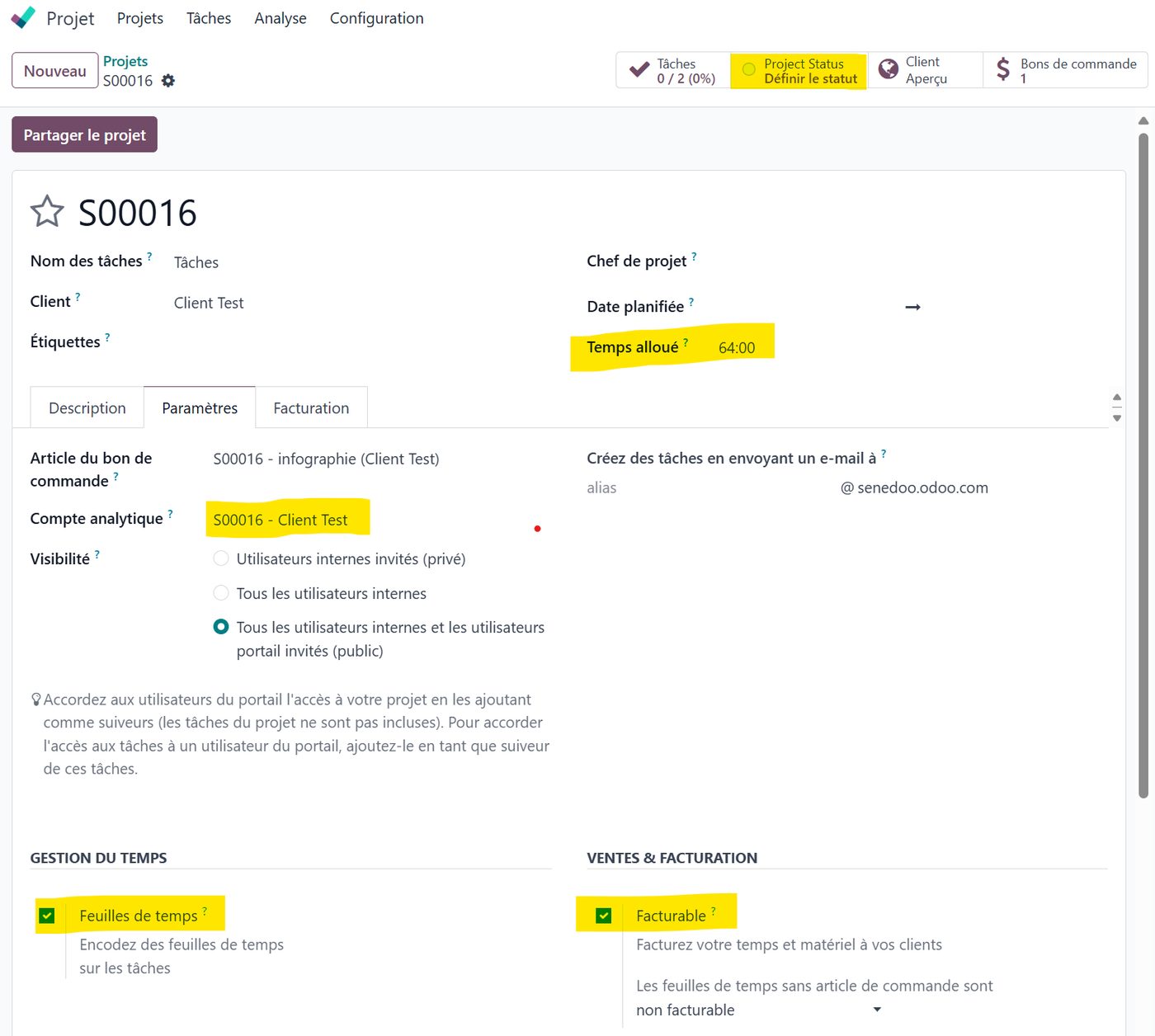
It has automatically created an analytic account, "S0016-Client Test", tied to the project, so the related costs can be known through analytic distribution (see the guide on project budget analysis).
It has also carried over the time invoiced — here 64 hours, eight days of eight hours — created a timesheet for each task, and valued the time spent. There is almost nothing left to do. Odoo has worked for us. Everything is ready for following the project.
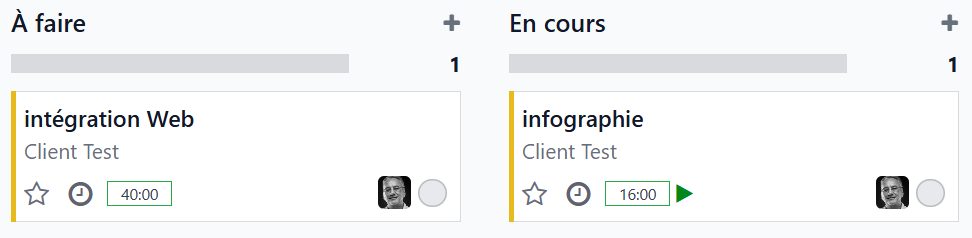
Let us click one of the tasks created in our project, the design task for instance:
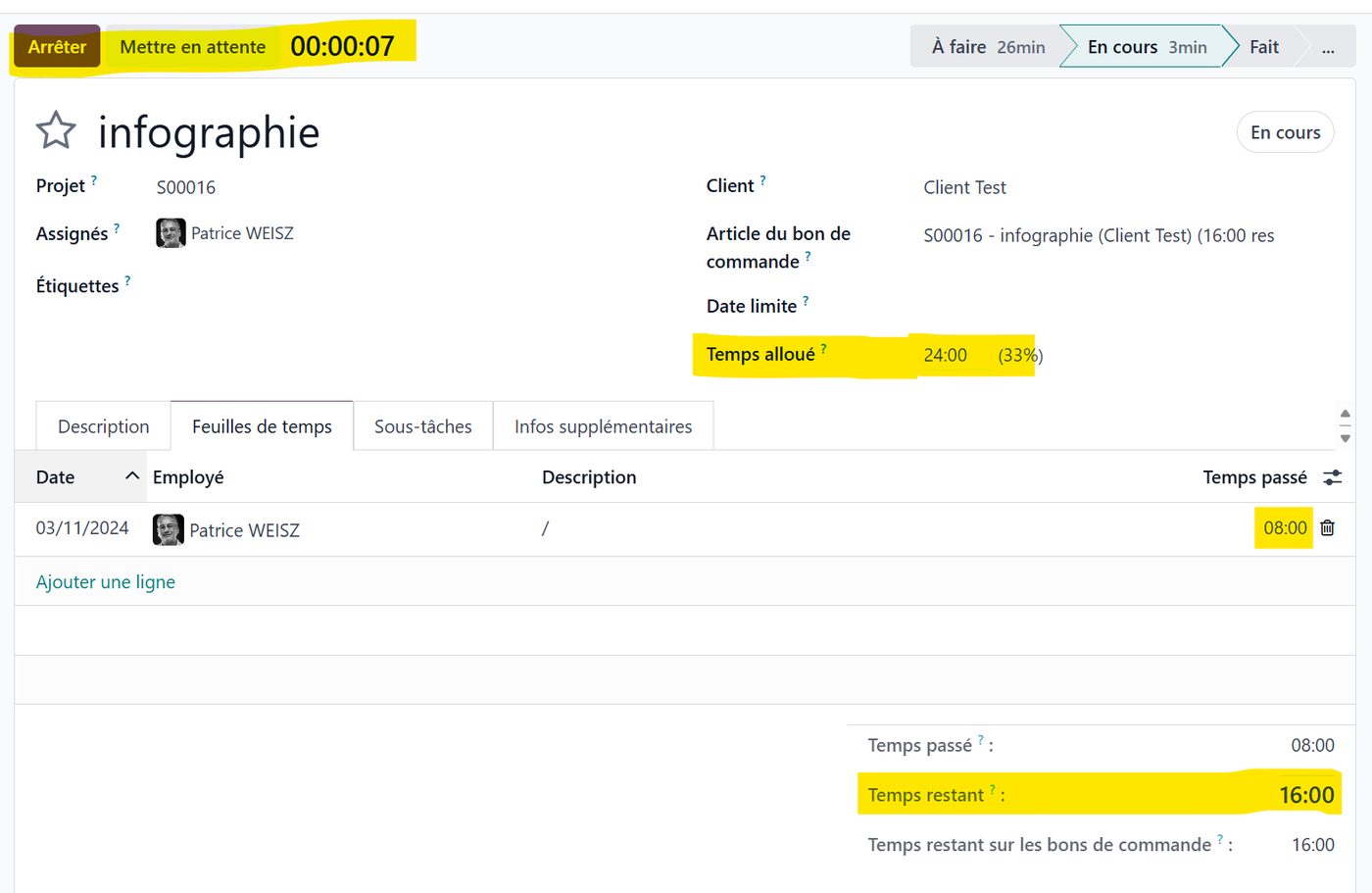
In the design task you can see that it is tied to the design order line, and that the time on the order is 24 hours (3 days). For the example I have entered time spent by the designer — 8 hours today — and Odoo works out the theoretical time remaining, 16 hours.
You can also start the task timer at the top left, and the real time will be counted into the timesheet until you stop it, at the end of the day for instance.
Working out the cost of the time spent
Finally, to close this small example, let us look at the state of the project by clicking its status, which shows a financial summary of the project:
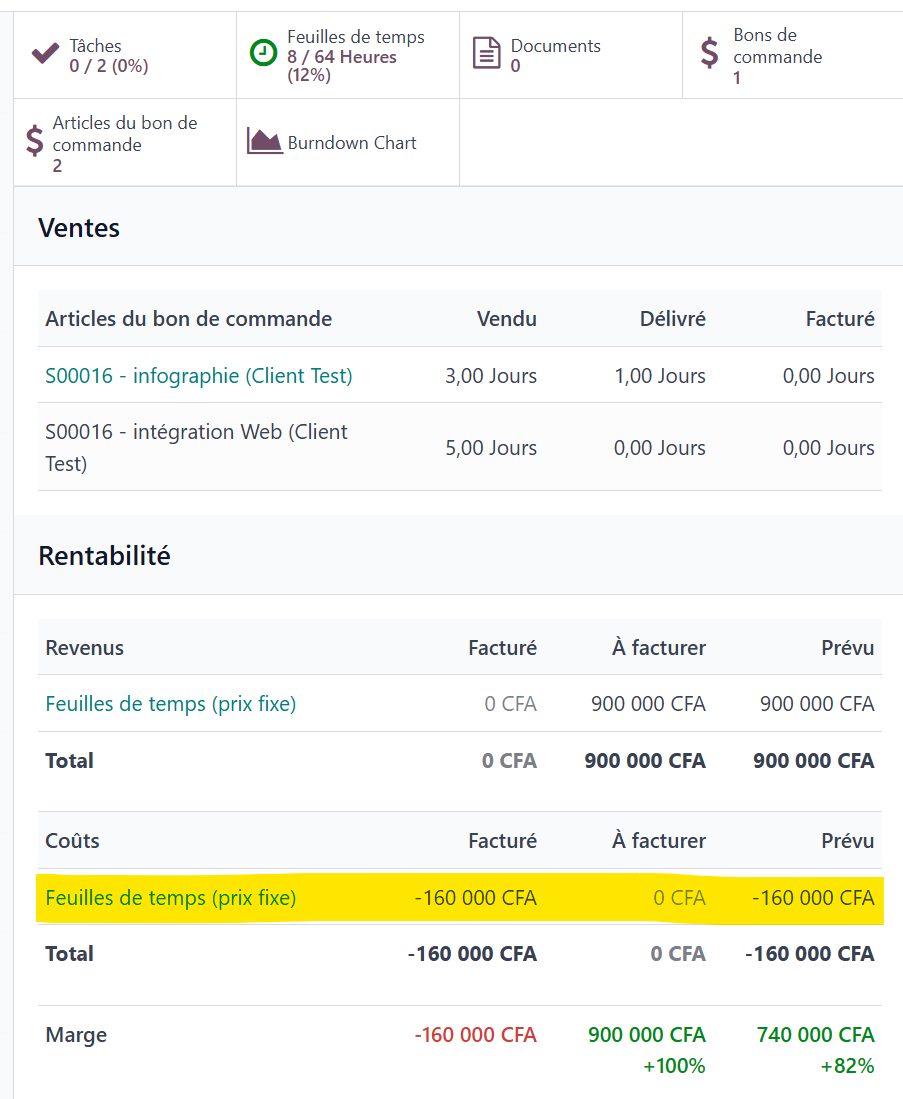
For the example, we entered an hourly cost of 20,000 F on the employee record.
Odoo has taken that hourly cost and, from the 8 hours entered on the timesheet, worked out a cost of -160,000 F (8 × 20,000 F), which comes off the project's profitability.
It shows what has been invoiced and what is still to be invoiced on the project.
Beyond the hourly cost, you can also charge other costs to the project through an analytic distribution — a supplier invoice charged to the analytic account tied to our project, for instance. (See our earlier guide: project budget analysis.)
You can see that in very few steps, from the sales order alone, Odoo has created a project perfectly suited to following the work in terms of tasks, estimated and actual time, and profitability.
And there you are.
We hope this small example has shown you how easy Odoo is to use, and how much it can do for managing the time and the costs of a project.
If you would like to know Odoo better, or if you are thinking of deploying this fine tool in your organisation, do get in touch with one of our experts using the "Get in touch" button at the top of this page.