Odoo Recruitment
From job ad to hire.
Jobs published on your website, applications sorted by stage, interviews scheduled: hiring creates the employee.
What the Recruitment app does.
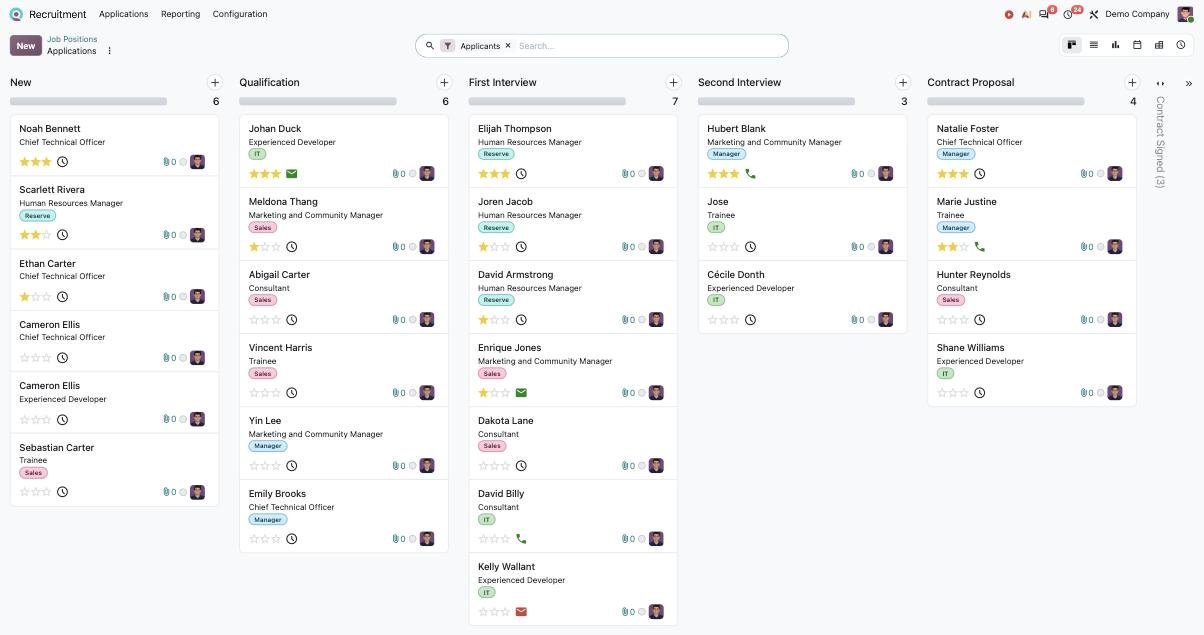
Every open position on a single dashboard, each showing vacancies left, applicants in progress and scheduled activities.
Applications move through editable stages, each able to trigger an action such as an e-mail; a colour code shows whether the candidate is ready, blocked or in progress.
A job ad is published to or removed from your website in one click and can be relayed to job boards; reports show which channels bring the most applicants.
Online applications are recorded with no re-typing; automatic CV reading (OCR) can be set to automatic, on demand or off.
A custom test or questionnaire can be sent to applicants; their answers help sort profiles before interviews.
Candidates pick their own slot from the recruiter's availability; invitations go out from Odoo, whose calendar syncs with Google Calendar or Outlook.
From the applicant card you e-mail, call or schedule; ready-made templates (acknowledgement, refusal, invitation) go out automatically when an applicant enters a stage.
The candidate reviews the offer, adds their details and signs remotely; they then become an employee in one click, and the onboarding plan starts.
What Senedoo adds.
Apps that work with Recruitment.
All Odoo HR apps