
Every feature
Invoicing, bank, fixed assets, analytics, currencies, closing: sixteen feature families, from quotation to balance sheet.
See the features →Statements and returns
OHADA balance sheet and income statement, trial balances, VAT, BRS, CEL, DGID withholdings, CSS-IPRES: what Odoo ships, what Senedoo adds.
See the statements →Sage to Odoo migration
General ledger, chart of accounts and partners moved over in five steps; trial balance reconciled account by account before anything is posted.
Migrate from Sage →Odoo accounting
OHADA accounting, kept by your operations.
Invoice, receipt, bank statement, till, payroll: posted to the right OHADA account with the right tax. The accountant checks.
Sales, purchases, inventory, till, payroll and accounting share partners, products and accounts: one figure everywhere.
6- and 4-column balances, expandable income statement, VAT, BRS, CEL, DGID withholdings, CSS-IPRES, SEN-ETAFI package.
Odoo Online: at the office, at home, on your phone; backed up and upgraded without a version project.
From Sage, Excel or another package: trial balance reconciled account by account before anything is posted.
What accounting kept apart from operations costs you
The same four problems come up at every company we meet — a standalone accounting package, spreadsheets around it, and an accountant who receives everything at month end.
Keying and re-keying
Invoices typed twice, statements ticked by hand, till copied the next day. In Odoo, each operation writes its entry; what remains is checking.
Obligations tracked from memory
VAT, BRS, withholdings, stamp duty, CEL, CSS, IPRES: thirty deadlines a year, with penalties. In Odoo, the calendar generates them and prepares each return.
Cash seen too late
Receivables and payables surface at closing. In Odoo, the bank is reconciled as you go and 360-day ageing is up to date every morning.
A closing that takes weeks
Trial balances redone in Excel, tax package built by hand. In Odoo, trial balances, balance sheet, income statement and OHADA statements come straight out of the database.
Every operation writes its own journal entry
The arrows show which way the data flows: the company's operations on one side, money coming in and going out on the other, everything converges on accounting — which in turn feeds the statements, the tax returns and the dashboards. Nothing is keyed in twice.
Operations
Quotations, orders, invoices and credit notes: the validated invoice posts to 411 and 70, output VAT included.
Order, receipt, vendor bill: three-way matching, inventory valued continuously, BRS withheld at source.
The validated payroll batch posts salaries, contributions and withholdings, company by company.
Accounting
OHADA, adapted to Senegal by Senedoo
- Revised OHADA chart, journals, 18 % and 10 % VAT
- Assisted matching and bank reconciliation
- Fixed assets, deferred expenses, analytics
- Multi-company and multi-currency, locked closing
Money
Statements imported or synchronised, matched to invoices by rules and amounts.
Every closed point-of-sale session is posted: cash, card, Wave, Orange Money.
The photographed receipt becomes an expense, refunded through payroll or by transfer.
What accounting feeds
Balance sheet, income statement, trial balances, ageing; the morning figures for management, against budget.
VAT, BRS, DGID withholdings, CEL, CSS-IPRES: prepared from the entries, reminded by the deadline calendar.
Everything Odoo accounting does
Sixteen feature families, from quotation to balance sheet. Items marked Senedoo are our add-ons, installed in your Odoo SaaS database; everything else is standard Odoo, configured for Senegal.
Customer invoices
- Invoices from the quotation, order or delivery
- Credit notes, down payments, payment terms
- Sent by e-mail, paid online on the customer portal
- Legal mentions, NINEA and RCCM on the invoice
Vendor bills
- Automatic digitisation of bills received by e-mail
- Order, receipt and bill matching
- 5 % BRS withheld at source — Senedoo
- Due dates and scheduled payments
Bank and reconciliation
- Statements imported (Excel, CSV, CAMT, OFX) or synchronised
- Automatic reconciliation models
- Bulk matching of statement lines to invoices — Senedoo
- Internal transfers, bank charges, interest
Payments and follow-ups
- Vendor payment batches, cheques, cash
- Wave and Orange Money at the till — Senedoo
- Customer follow-ups by level, e-mails and letters
- 360-day customer and vendor ageing — Senedoo
OHADA chart and taxes
- OHADA localisation: revised chart, journals, taxes
- 18 % and 10 % VAT, exemptions, exports
- Fiscal positions per customer or vendor
- Report codes: management headings above the chart — Senedoo
Fixed assets
- One record per asset, from the purchase bill
- Straight-line or declining depreciation, pro rata temporis
- Depreciation posted automatically every month
- Disposals and write-offs, gains and losses
Deferred expenses and revenue
- Start and end dates on the invoice line
- Automatic spreading over the months concerned
- Insurance, rent, subscriptions, annual contracts
Analytics and budgets
- Analytic plans: site, shop, department
- Percentage distributions on every line
- Budgets against actuals
- Analytic trial balance, by report code — Senedoo
Multi-currency
- CFA franc, euro, dollar, shilling: invoice and pay in currency
- Rates updated automatically
- Realised exchange differences posted at payment
Multi-company
- Several companies in one database
- Inter-company invoices and payments
- Statements per company or combined on screen
- Access rights per company and per user
Inventory valuation
- Weighted average cost or FIFO
- Stock entries at every move
- Landed costs spread over the products
Point of sale
- Every closed till session is posted
- Cash differences isolated on their own account
- Wave and Orange Money payments — Senedoo
Payroll posting
- Payroll entry generated per batch, company by company
- Accounts per salary rule, analytic distribution
- Paid-leave provision at year end — Senedoo
Expenses
- Receipt photographed from the phone
- Approval by the manager
- Refund by transfer or through payroll
Closing and control
- Lock dates per period and per journal
- Secured entries, audit trail
- Retained earnings computed automatically
- Dated reversals and adjustments
Deadline calendar
- Thirty Senegalese tax and social obligations — Senedoo
- Legal dates and public holidays, e-mail reminders
- “Prepare the return” opens the statement for the period
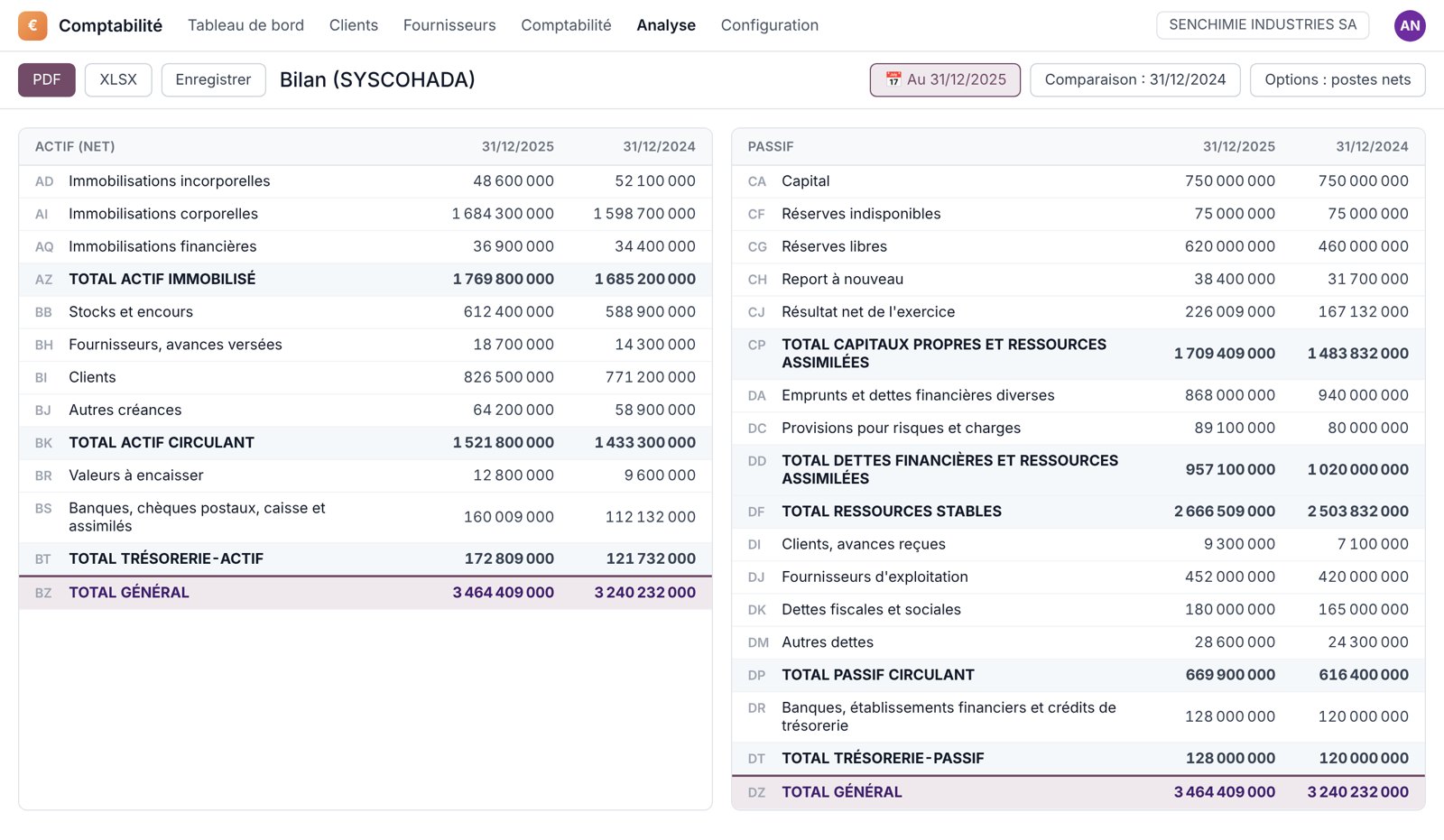
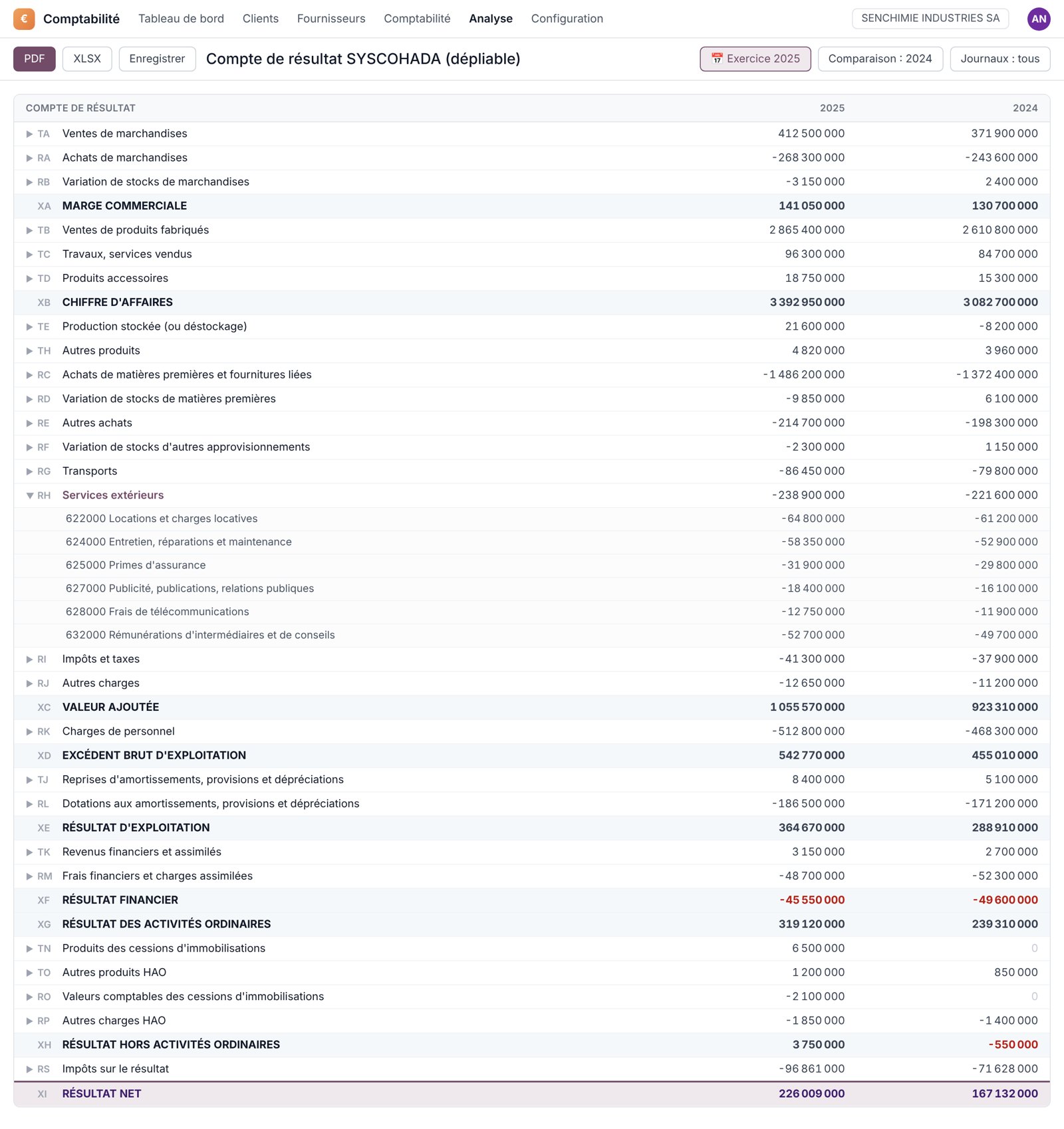
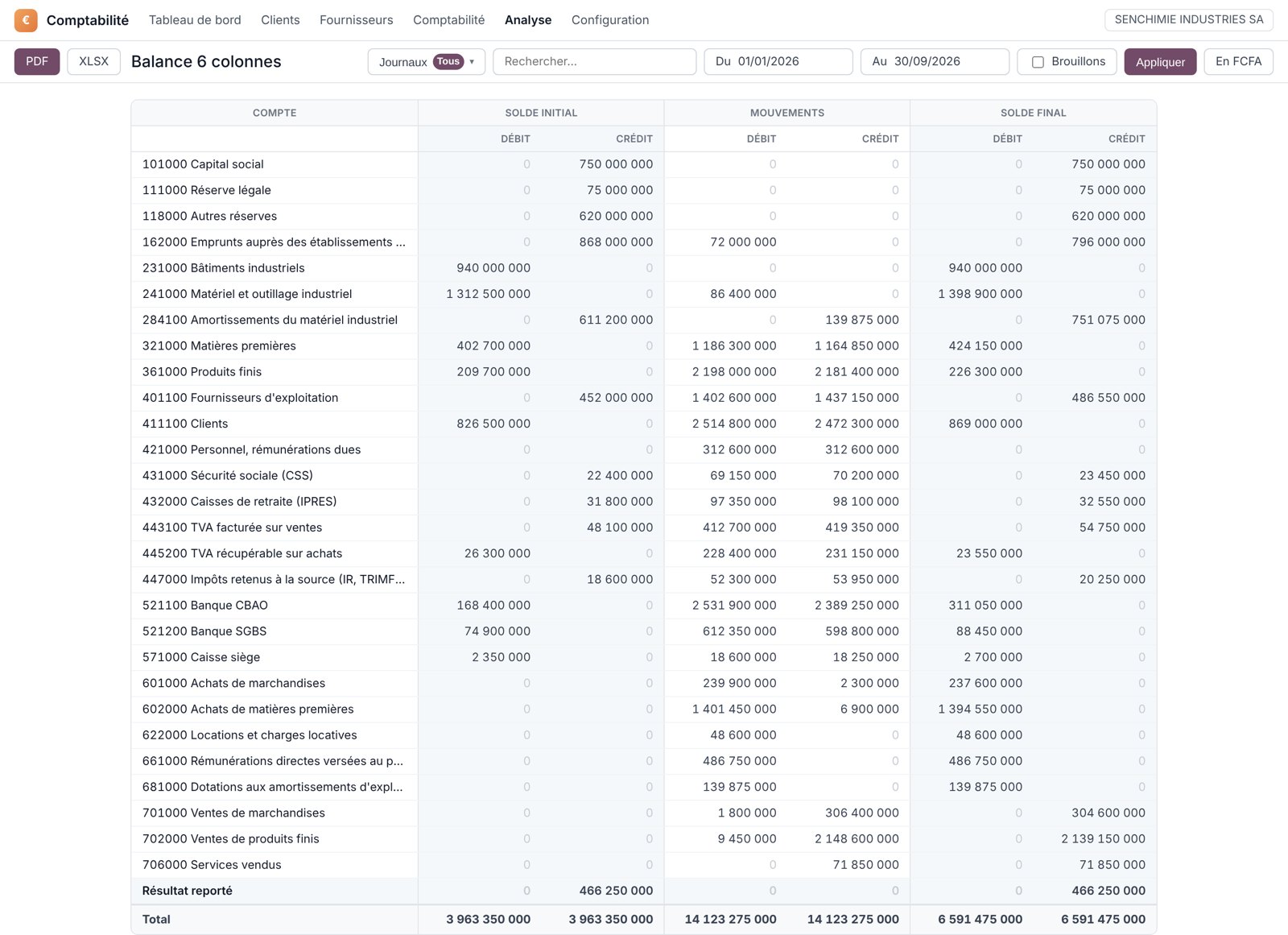
Balance sheet and income statement in one click, up to the minute.
Statements are computed on the current entries, for any period, compared with the previous year, and exported to PDF or Excel. The screenshots below show a fictitious company; the screens are those of Odoo and of our add-ons, in French.
Shipped by Odoo
- OHADA balance sheet and income statement
- Cash flow statement, executive summary
- General ledger, trial balance, journals
- Partner ledger and aged receivables and payables
- Tax report, invoice analysis
- Exchange differences, assets, analytics
Added by Senedoo
- Net six-column trial balance and cumulative four-column trial balance
- Expandable OHADA income statement, heading by heading
- Six-column partner trial balance, customers and vendors
- Customer and vendor ageing to 360 days (Odoo stops at 120)
- Report codes, trial balance and analytic balance by report code
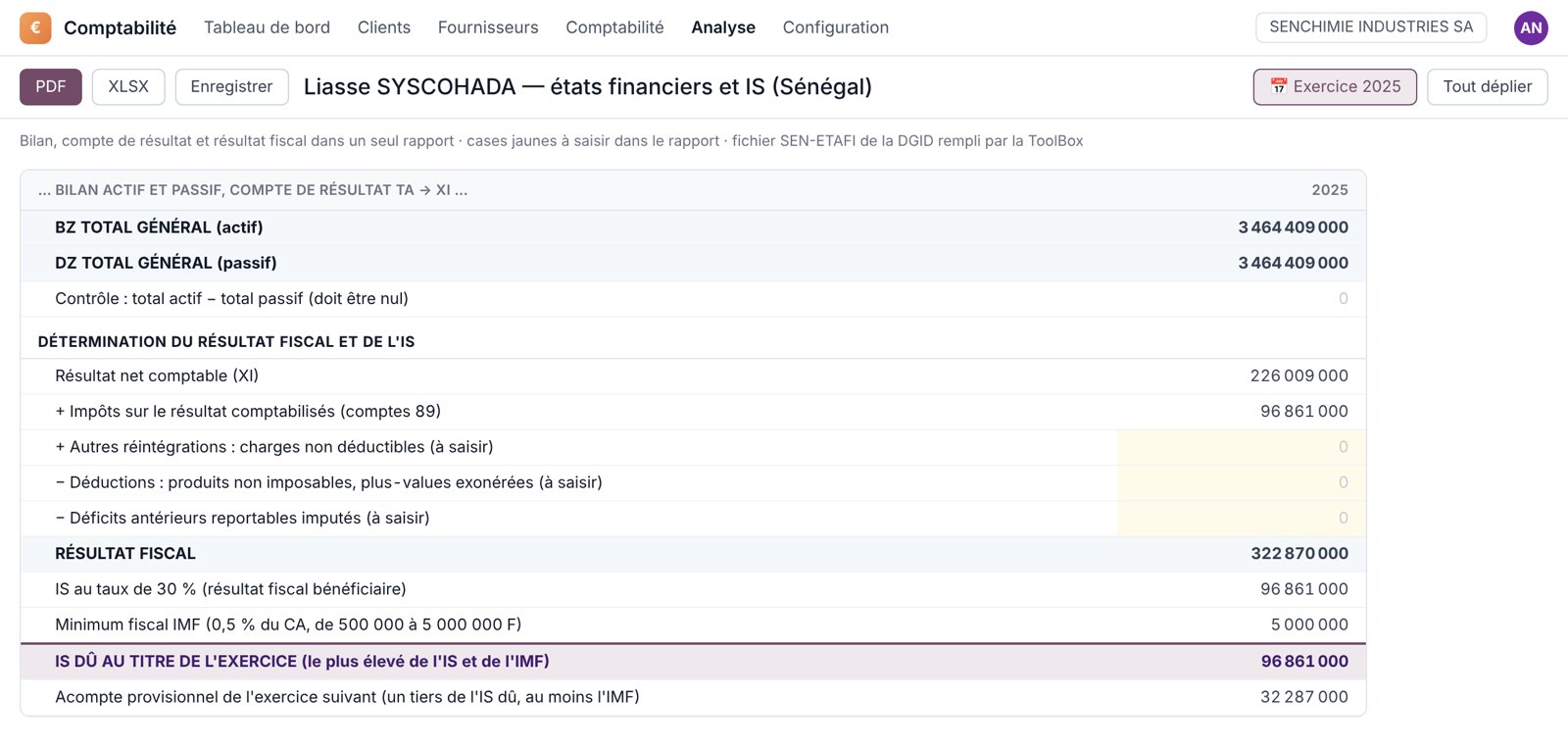
- OHADA financial statements: taxable profit, tax due, SEN-ETAFI file
- Finance reports in Excel, from the Accounting menu
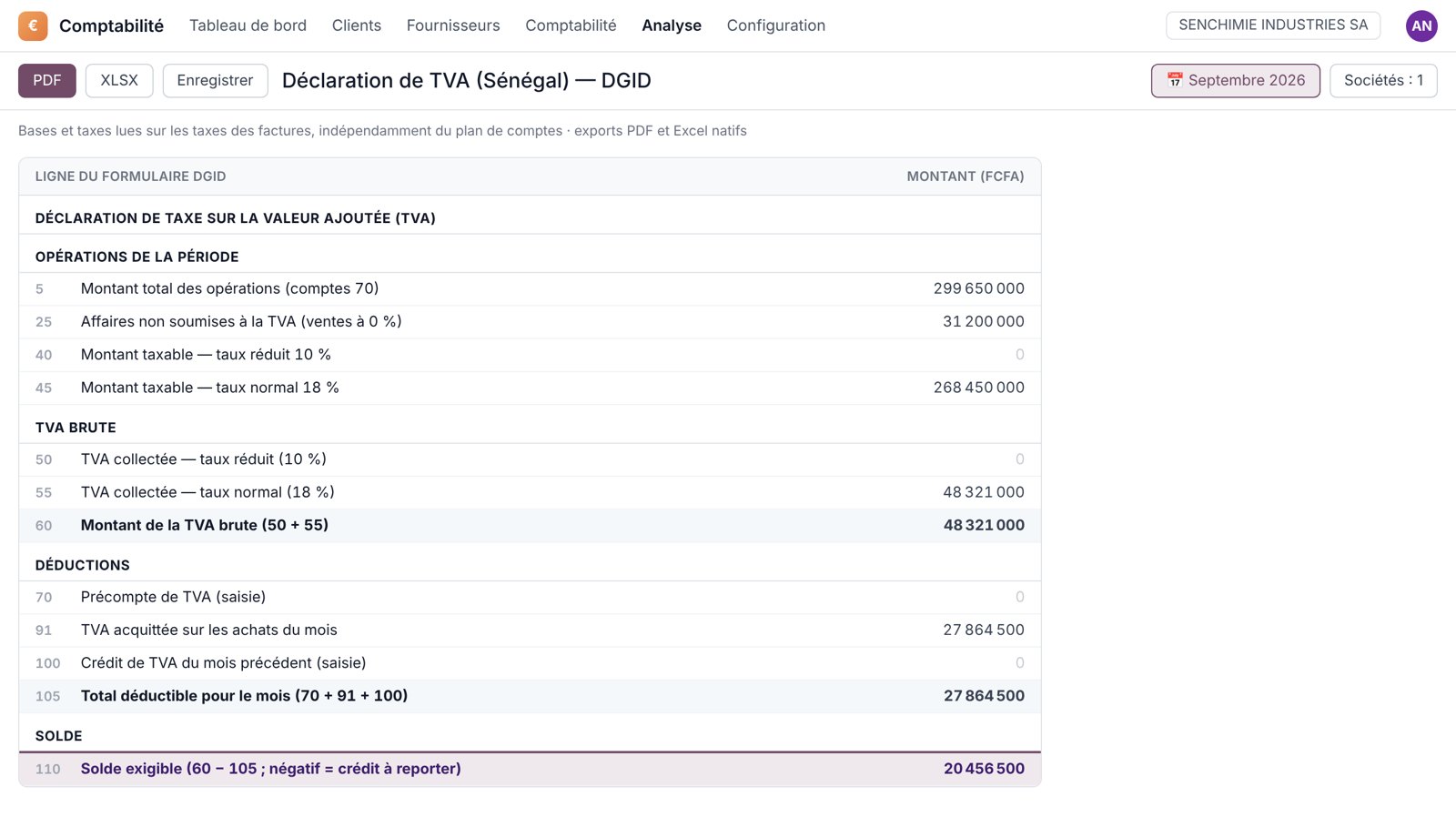
The DGID forms, filled in by your entries.
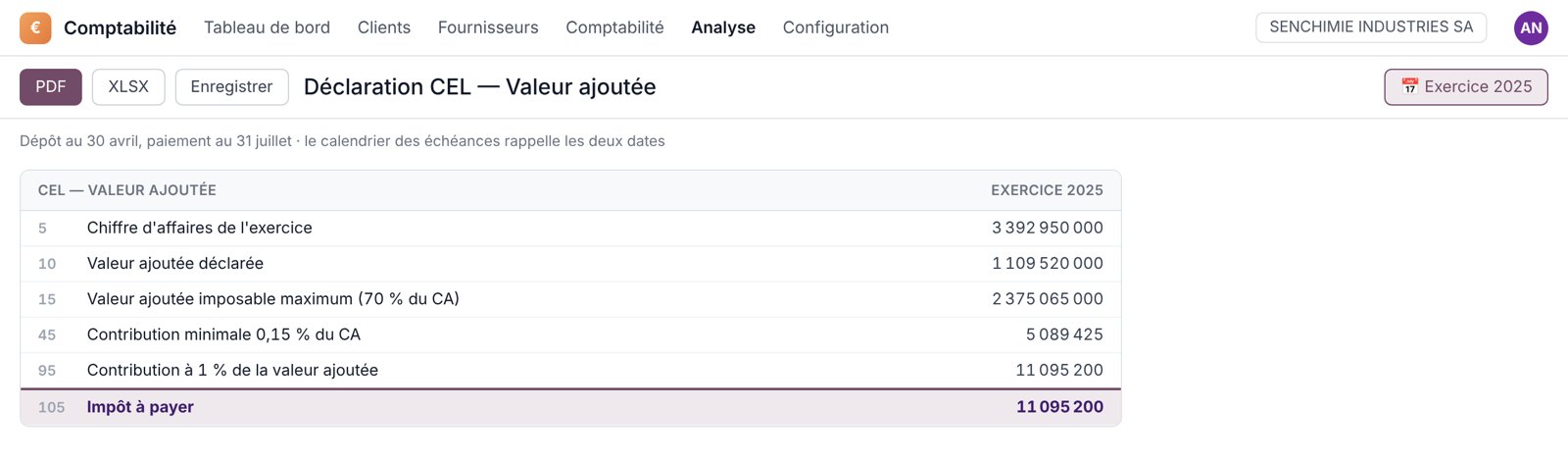
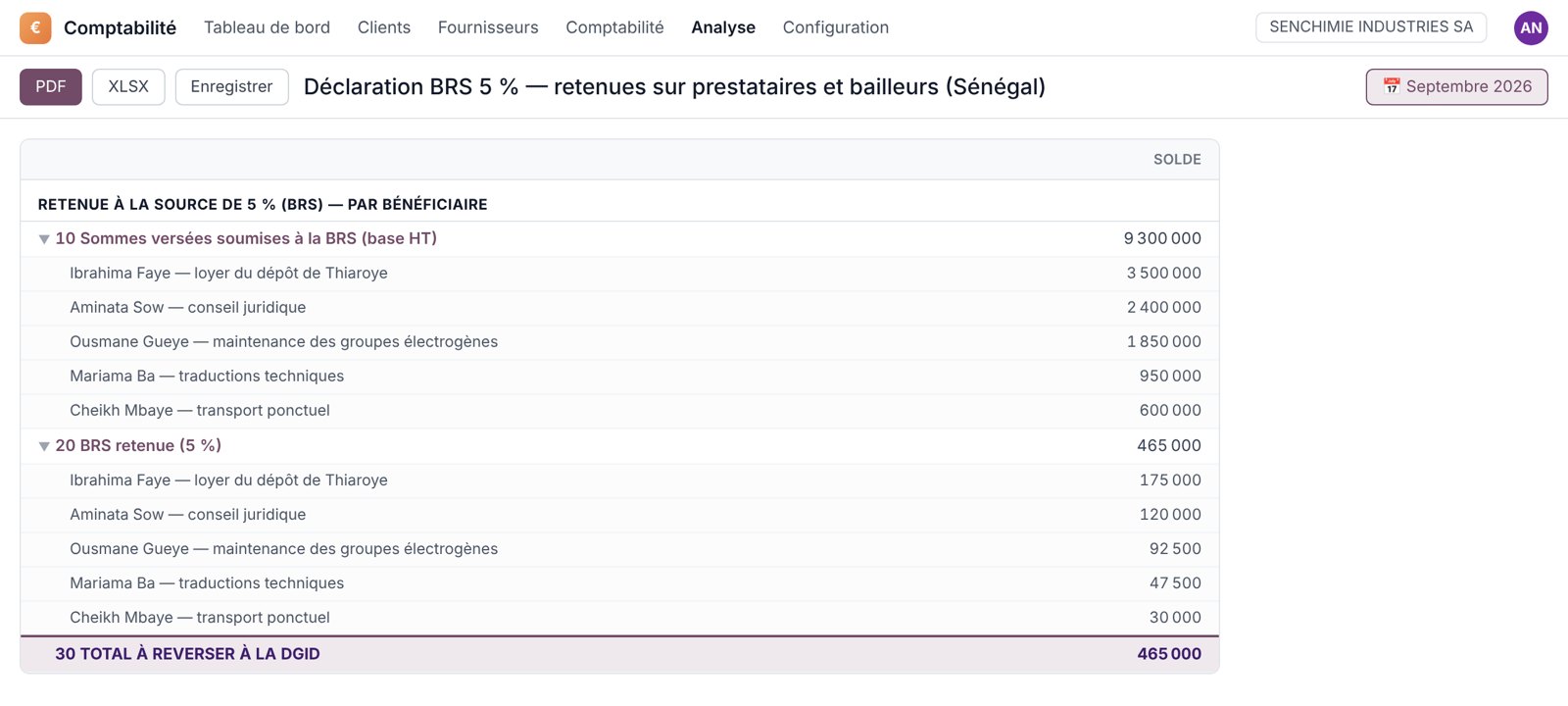
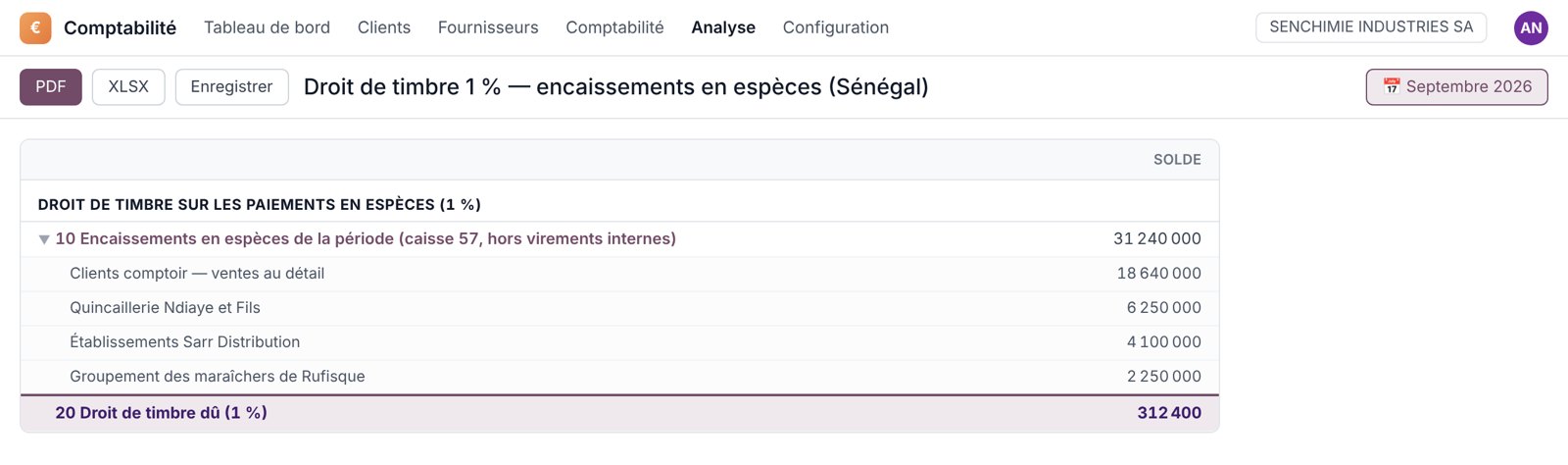
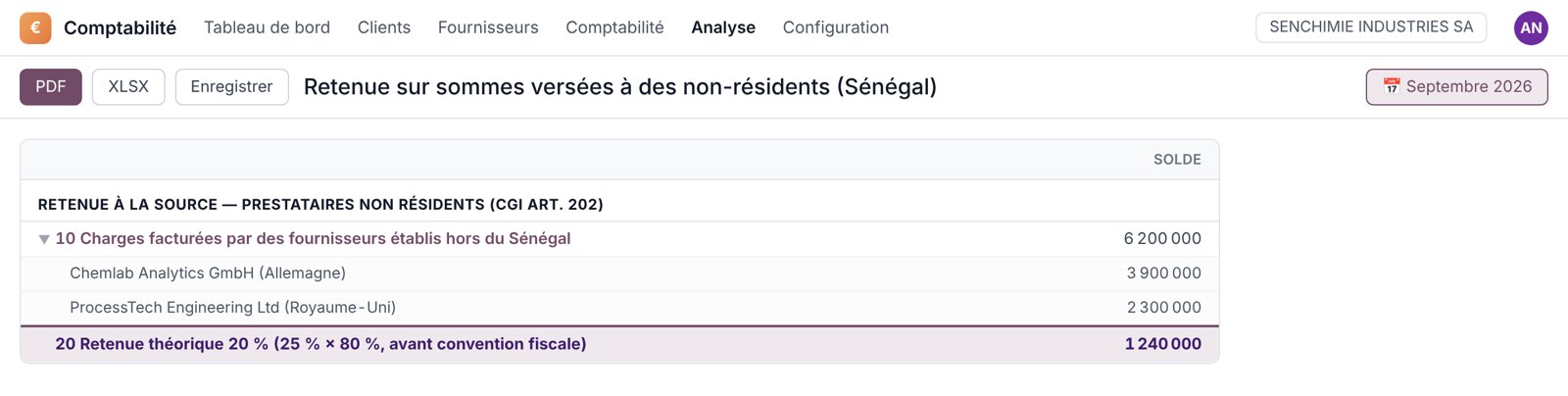
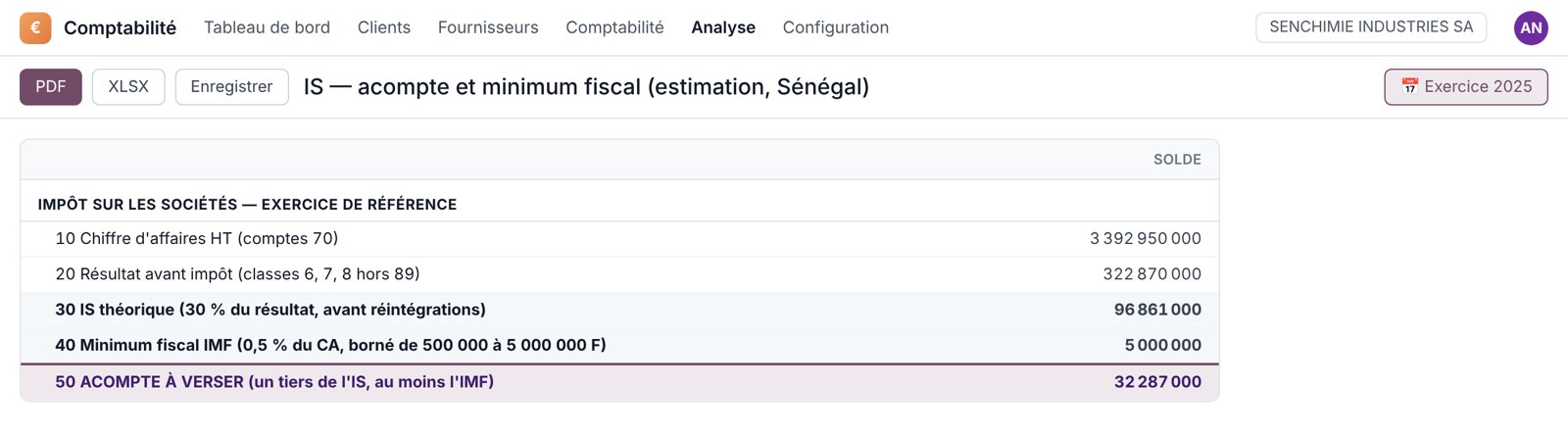
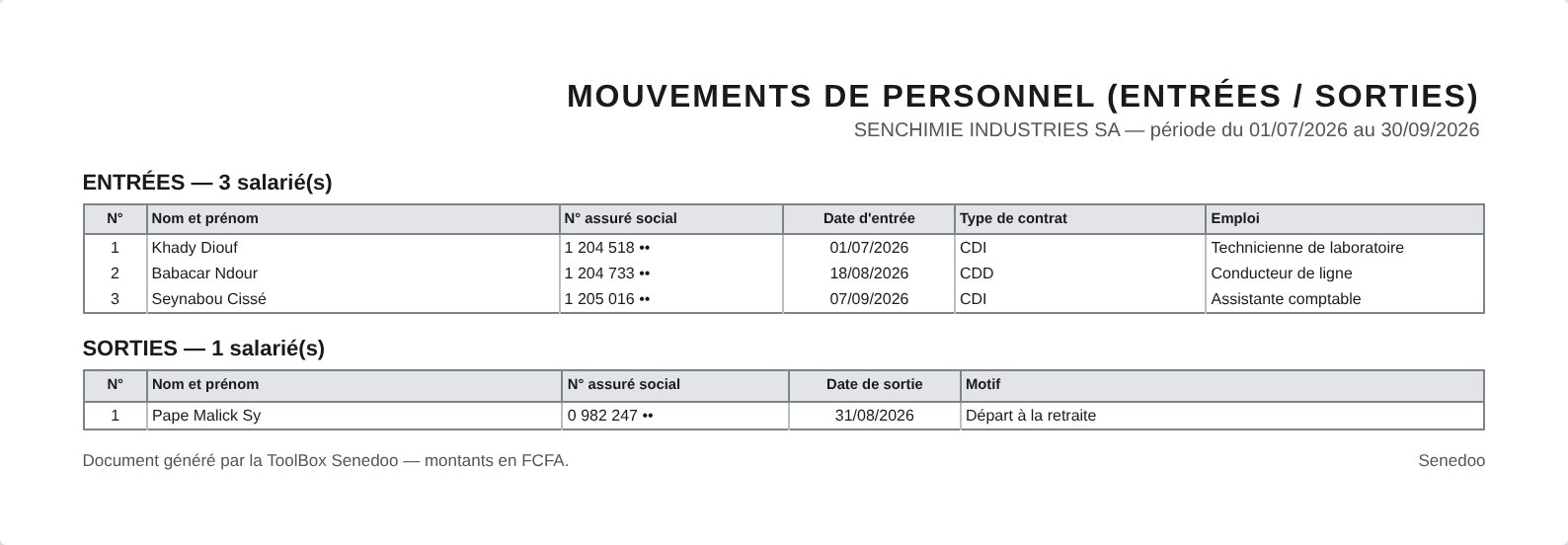
Odoo ships a generic tax report. Our add-ons add the Senegalese returns line by line, numbered as on the official forms: you copy computed amounts instead of adding them up by hand.
| Return | Type | Frequency | In Odoo |
|---|---|---|---|
| Tax report — output and input VAT, tax by tax | Tax | On demand | Standard Odoo |
| VAT return — DGID form, lines 5 to 110, standard and simplified regimes | Tax | Monthly | Senedoo add-on |
| Payroll withholdings — income tax, TRIMF, CFCE | Tax | Monthly or quarterly | Senedoo add-on |
| 5 % BRS — base and withholding per payee, statement of amounts paid to third parties | Tax | Monthly | Senedoo add-on |
| Withholding on payments to non-residents | Tax | Monthly | Senedoo add-on |
| 1 % stamp duty on cash receipts | Tax | Monthly | Senedoo add-on |
| CSS and IPRES contributions — family benefits, work injury, pension | Social | Monthly or quarterly | Senedoo add-on |
| OHADA financial statements — balance sheet, income statement, taxable profit and tax due; DGID SEN-ETAFI file generated from an Odoo menu | Accounting | Annual | Senedoo add-on |
| Corporate income tax — instalments, minimum tax and final balance | Tax | Instalments and balance | Senedoo add-on |
| VAT pro-rata adjustment — non-deductible share to pay back | Tax | Annual | Senedoo add-on |
| RVM — withholding on dividends and directors' fees | Tax | Quarterly | Senedoo add-on |
| CEL on value added | Tax | Annual | Senedoo add-on |
| CEL on rental value — leased and owned premises | Tax | Annual | Senedoo add-on |
| Annual salary statement (1024), payroll ledger, DNS | Social | Monthly and annual | Senedoo add-on |
| IPRES staff movements, DASMO or social report | Social | Quarterly and annual | Senedoo add-on |
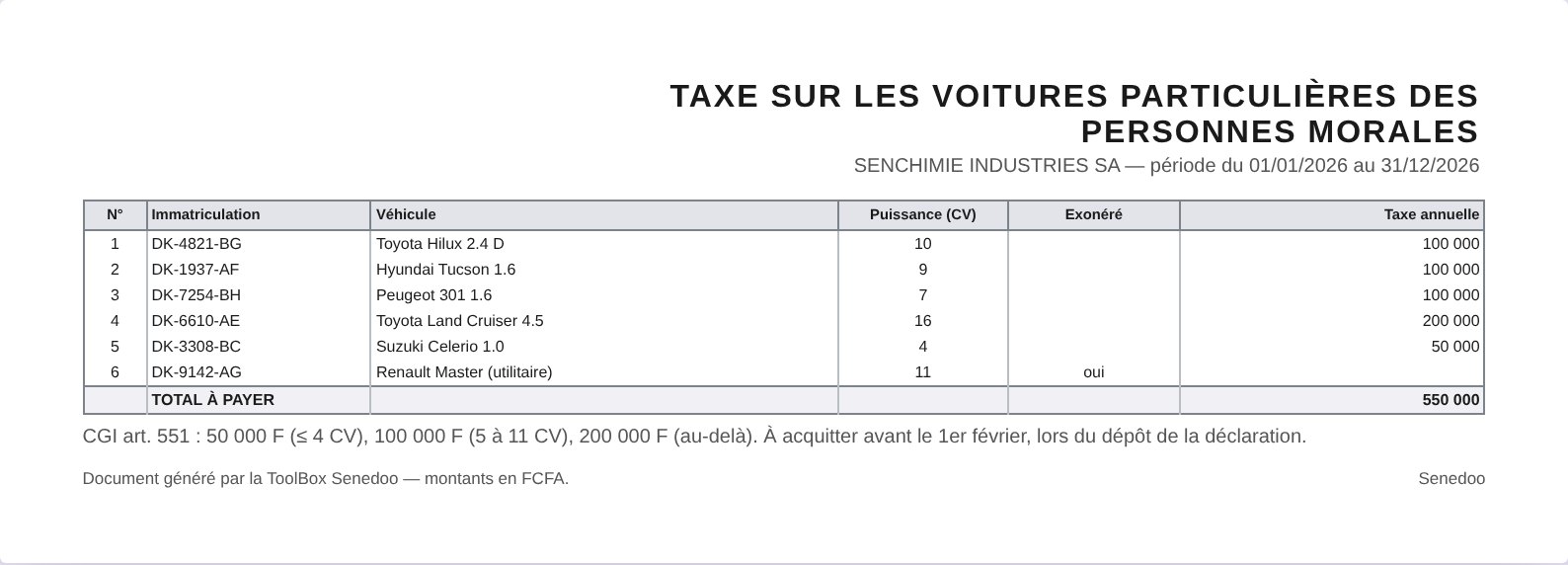
| Company car tax | Tax | Annual | Senedoo add-on |
Each of these returns is linked to the deadline calendar: the legal date for the period, an e-mail reminder, and the “Prepare the return” button that opens the statement on the right period. Filing remains the company's responsibility; we update the statements with every finance act.
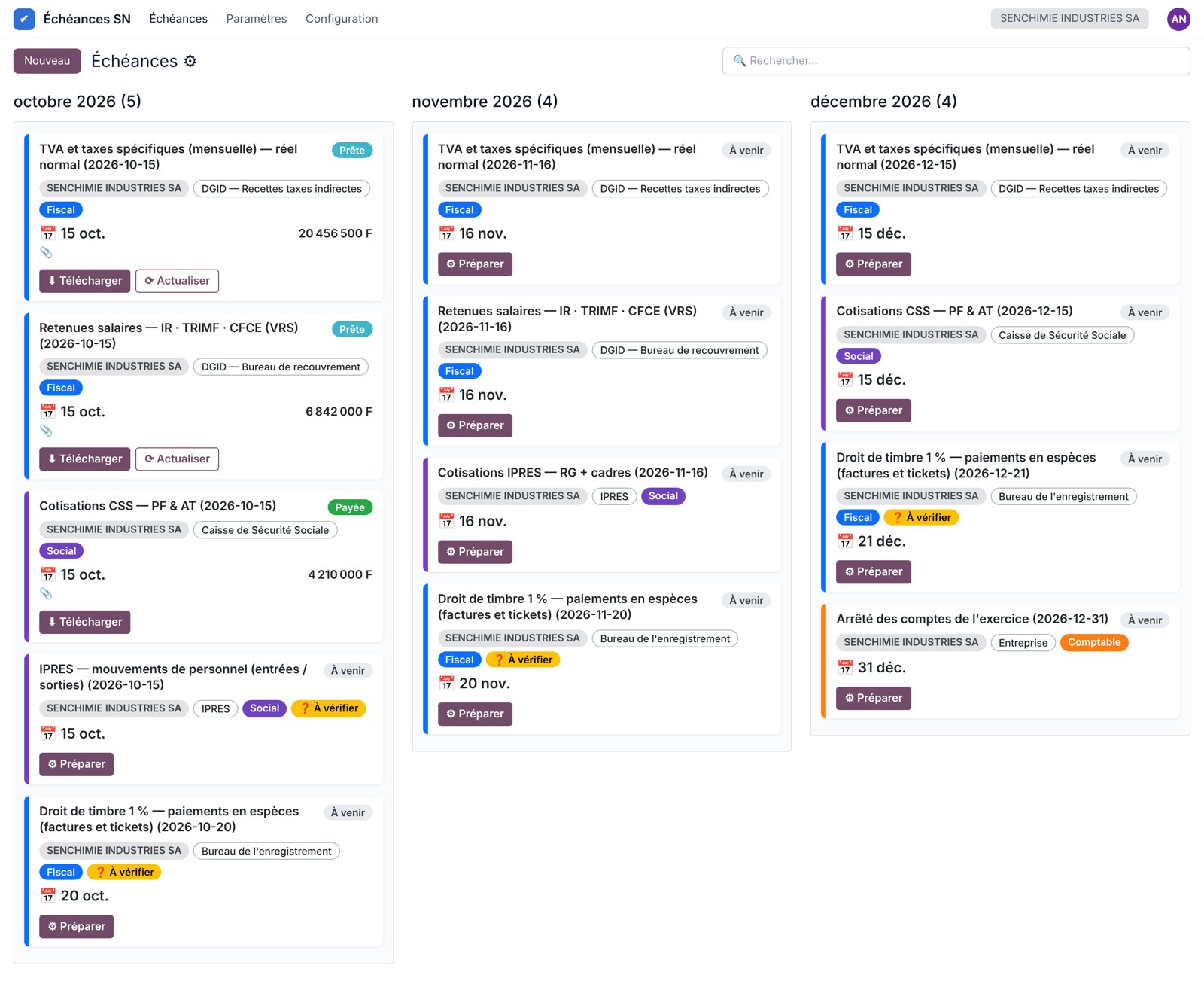
The Senedoo add-on: the deadline calendar, then the statements that fill it in.
The add-on installs in your Odoo the register of thirty Senegalese obligations — tax authority, CSS, IPRES, labour inspectorate — and generates your company's deadlines every month, on the legal dates shifted for public holidays. Each deadline is linked to its statement: one click on “Prepare the return” opens the report on the right period, and the estimated amount comes back into the list. At year end, the OHADA financial statements compute taxable profit and tax due, and the ToolBox fills in the SEN-ETAFI file to upload to the DGID platform.
Still on Sage? The migration is reconciled to the franc, or not posted.
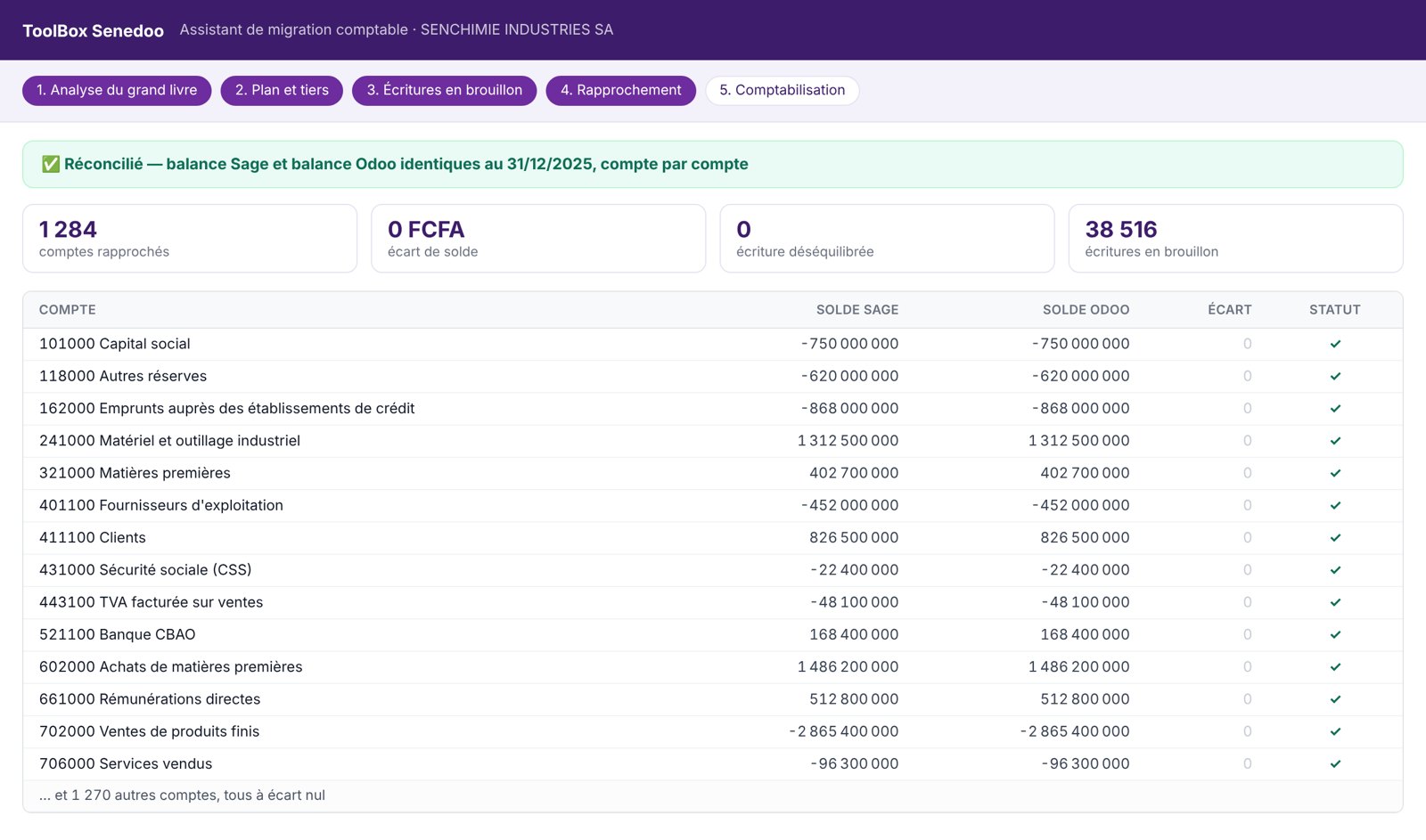
Sage keeps your books; everything else — quotations, inventory, tills, payroll, follow-ups — lives in spreadsheets. Moving to Odoo, you keep your history: the general ledger, chart of accounts and partners are moved over by our migration assistant, and Odoo's trial balance is compared with Sage's, account by account, before anything is validated.
| Today, with Sage | ✔ Tomorrow, with Odoo and Senedoo |
|---|---|
| Accounting on one side, sales and payroll on the other, re-keyed between the two. | Sales, purchases, stock, till, payroll and accounting in the same database: a validated invoice is posted, with no re-keying. |
| Licence per workstation, server or PC in the office, backups to do yourself. | Subscription per user, in the Odoo cloud: accessible anywhere, on mobile, backed up and upgraded with no version project. |
| Returns and the tax package are finished in Excel. | VAT, BRS, DGID withholdings, CEL, CSS-IPRES, OHADA statements and the SEN-ETAFI file: prepared from your entries, reminded by the deadline calendar. |
| The month's figure arrives at closing, a month later. | Balance sheet, income statement and cash up to date every morning, all companies, against budget and last year. |
| A question? A ticket, a trip, a wait. | A WhatsApp group with your consultants, picked up in under 15 minutes. A message, a voice note or a screenshot is enough. |
General ledger analysis
OHADA localisation, account format, missing journals and partners, unbalanced entries: everything is listed before anything is touched.
Chart of accounts and partners
Sage chart imported, partner codes replaced by their names, sub-ledger or control accounts.
Draft entries
Numbered by journal and month, Sage labels kept, credit notes and opening entries handled.
Reconciliation
Overall trial balance and every account balance compared with Sage. The report is handed to you.
Posting
Only on your explicit approval. Every step can be undone.
Why keep your books in Odoo with Senedoo
No re-keying
Invoices, receipts, tills and payroll write their own entries. The accountant checks and analyses instead of copying.
Up to date every morning
Today's balance sheet and income statement, not the closing's: management steers on fresh figures.
Compliant in Senegal
Revised OHADA, DGID forms, CSS and IPRES: maintained for all our clients with every finance act.
In the cloud
Odoo Online: no server, no per-seat licence, accessible anywhere, backed up, upgraded without a version project.
Accounting never stands alone
Odoo payroll software
Payslips under 29 collective agreements, payroll ledger, DNS, CSS-IPRES: the payroll entry lands in accounting already adapted to Senegal.
See payroll →Dashboards
Sales, margin, cash, receivables and payables read every morning, across companies, against budget and last year.
See dashboards →Implementation
One project lead, one schedule, a copy of your database to practise on, and every role trained on its own screens.
See the method →What we are asked before we start
Does Odoo produce the OHADA balance sheet and income statement?
Yes. Odoo's OHADA localisation ships the revised chart of accounts and the OHADA balance sheet and income statement. Senedoo adds the expandable income statement, the six- and four-column trial balances, the partner trial balance and the 360-day ageing that accountants ask for.
Can our Sage history be migrated?
Yes: general ledger, chart of accounts and partners. Our assistant rebuilds the entries as drafts, then compares Odoo's trial balance with Sage's, overall and account by account. Nothing is posted until both are identical, and every step can be undone.
Are the returns filed automatically?
No: Odoo prepares the amounts, line by line, numbered as on the official form, and the deadline calendar reminds you of every date. Filing on the DGID, CSS or IPRES platform is still done by you or your accounting firm.
What about the year-end tax package?
The OHADA financial statements add-on produces in Odoo the balance sheet, the income statement and the taxable profit calculation — add-backs and deductions are entered in the report — down to the tax due and the next instalment. The ToolBox then fills in the DGID's official SEN-ETAFI template: cover page, balance sheet, income statement, cash flow statement and notes, ready for your accountant to review.
Can our chartered accountant work in Odoo?
Yes. They get an accountant access to your database: they consult, reconcile, post year-end entries and export their statements to Excel, without you sending them files.
Do we need a server?
No. Everything runs on Odoo Online, Odoo's cloud edition. Our add-ons are installed as data, with no Python module: your database stays standard and is upgraded like any other.
How long does it take to start?
For one company: two to four weeks, history migration included. Several companies, several currencies or a payroll to take over lengthen the schedule, which we write with you at the assessment meeting.
Move to accounting kept by your operations.
A certified Odoo consultant migrates your history, sets up the OHADA chart and your returns, and trains your team on its own database.